
Solid State Drive (SSD) Review
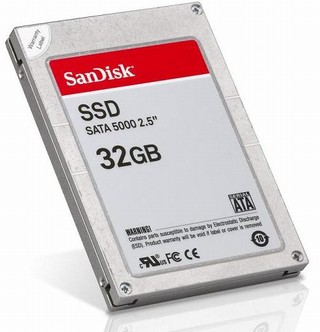
About 6 months ago I purchased the Dell XPS M1330 (fully loaded), which was the first laptop with a solid state drive (SSD) included as an option from Dell. Of course I went with the SSD option, the drive had a lot going for it. It’s faster for reading, it has no moving parts (hence uses much much less energy), it has an instant access time, it’s dead quiet, and so on. It’s now been 6 months since I purchased the laptop and I’ve been doing a significant amount of software development on this computer so I figure it’s a good time to give it a review, list the pros and cons of SSD’s. Things I would have liked to know beforehand.
Pros
Amazingly quiet.
There is no sound at all. It’s so quiet that you can’t tell if the drive is reading/writing, you have to look at the I/O indicator light on your box. That’s amazing!
Interestingly enough though, other sounds that you would never have expected come to the forefront and start to annoy you, noises that in the past were masked by your spinning hard drive. Did you know the capacitors on your Duo-core Intel chip actually make audible high pitch sounds? Most people don’t realize this and thinks it’s because of a number of different reasons, but it’s really the processor chip capacitors. There are some settings you can tweak to minimize this, it’s just that I can’t remember them (do it once and forget). And unless you have a truly quiet box like the M1330 with SSD, you won’t hear it.
Consistently Fast
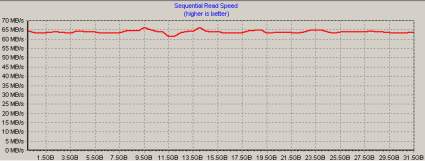
The drive is consistently fast. By this mean they’re speed graphs are amazingly flat. The normal magnetic/spinning hard drive graphs tend to drop off over time. It’s pretty standard and can be addressed by creating Raid systems. Nonetheless it’s still a limitation of spinning drives. Below are my hard drive performance graphs (laptop with SSD and desktop with HD) using HD Tach to run the tests.
SSD Performance Graph
HD Performance Graph
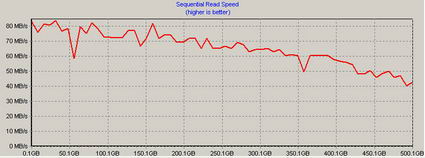
As you can see there’s definitely a difference over time. The more I/O the better the performance for the SSD versus HD.
Instance Access Times
SSD’s have virtually no access times. On my tests the random access time for the SSD was 0.2ms versus 12.2ms for the HD. In other words there was no access time for the SSD. This is because the drive doesn’t need to spin up. The drive heads don’t need to align. The data is basically transfered as fast as the circuit can push it through the addressing logic.
Another advantage of this is that you’ll never need to defragment your drive! It doesn’t matter how spread out the files are, the drive doesn’t need to move it’s head back and forth.
Fast Reads
Reading data from your SSD is faster than a normal 7200 RPM HD. If you have a WD Raptor high performance hard drive, that’s another story. Especially if you create a Raid 0 Rapter drive system. But compared to most drives, especially laptop drives, the SSD reads data faster.
No Moving Parts
The Solid State Drive has no moving parts, hence why it’s called a Solid State Drive (SSD). There is no moving head. No spinning disks moving at incredible high speeds. And because of that it’s also much more resilient to bumps and bruises. You still have to worry about damaging your laptop as a whole if you drop it, but your drive is now much less likely to get damaged. Your laptop can take more abuse.
Long Battery Life
Because an SSD has no moving parts it requires very little energy compared to a normal spinning HD. This means a much longer battery life. Not just a few minutes more, but a significant amount more. I’ve seen claims of as much as an hour or more of extra battery life compared to a normal HD. That’s enough to make a noticeable difference on flights, in meetings, etc.
Very Low CPU Usage
I don’t claim to fully understand this aspect of SSD versus HD, but with an SSD the CPU (processor) gets used a lot less than with an HD. One article reports that the CPU usage difference is 3.2% for SSD versus 21.4% for a normal HD (for me the difference was 1% versus 8%). This means your machine runs faster and again uses up less energy to access your data. How exactly does that translate into your user experience I don’t know, but it can’t hurt. I know that I’ve had my laptop running in a presentation for 4 hours on battery without any issues.
Cons
I/O seems to lock up Windows
This is the biggest con by far, and I don’t know if it’s because I upgrade downgraded to Windows XP but for some reason whenever there is heavy I/O activity (lots of reading or writing to the hard drive), Windows seems to lock me out. I suspect this is due to less than stellar drivers but I haven’t been able to figure it out yet (also I haven’t really had the time to play with it). This can be very annoying, especially if you’re performing some heavy I/O operations like compiling larger projects. If anyone has any ideas as to why this is, please feel free to comment.
Very Small Disk Size
I bought the first generation SSD (actually it’s really the fifth generation but for the general public it’s really the first affordable generation) that came optional with a laptop from Dell. And because I was an early adopter it cost a lot, I believe the SSD option came to $500 alone. That wouldn’t be so bad, but unfortunately it comes with a very small disk size, all of 32GB. This is chump change compared to today’s disk drives. Most laptops don’t come with anything less than 100GB. Desktop hard drives come in 250+GB. Good luck finding anything less than that.
The problem is that with 32GB you have barely any room to move. Don’t think of installing any games on the SSD, there’s just no room. I was able to squeeze a very productive software development environment onto my laptop, but that’s it. There’s no room left for any entertainment software (games, videos, music, etc.). I understand that the latest SSD offering from Dell comes in at 64GB which should really help this issue, but it’s not cheap either. Last I heard it was starting at $1000.
Cost
If you haven’t already realized it from my previous con, the cost is very high (without even considering the disk space). It’s not a percentage higher, it’s multiples higher. And when you factor in disk space, it’s pretty much an order of magnitude higher in price. Is it worth it? That’s the million dollar question. If you’re a person who loves to be on the bleeding edge of technology then it’s not too bad. For an ordinary consumer it’s still too expensive.
Slow Writes
This is where there is a large difference in performance between the different SSD’s out there. According to one article comparing three SSD’s, the range for writing data was 71MB/sec, 31.2MB/sec, and 13MB/sec (13MB/sec is brutally slow). Of course the one that comes with the Dell M1330 laptop is the 13MB/sec for writing. Unfortunately this means that it writes much slower than a normal spinning HD which generally writes in the 50+MB/sec. In other words it’s 3-4 times slower when writing to the disk.
This isn’t so bad when you consider you rarely write to your disk, most of the time you’re reading. Starting applications involves reading. Playing a video game is 99% reading. Running an application is mostly reading. If you use Microsoft Word for example, you only save intermittently. And the file sizes aren’t that large to make it too noticeable.
One caveat though is software development. Thank god for IDE’s like Eclipse which compile on demand. Eclipse will only compile what’s changed, not the full project. Otherwise, compiling the full project can be painful! I can’t imagine doing this in some other IDE’s. So be careful if you’re using an SSD for development, make sure it has acceptable write speeds!
Limited read/writes
One of the most commonly listed disadvantages for SSD’s is the number of read/writes they can perform. However if you actually do the math you’ll find that the lifespan of an SSD verus an HD is comparable. Google recently posted a very intensive and detailed report on HD failures and I can tell you it’s not all rosy for spinning HD’s. My LandlordMax continually gets support requests from people who’ve had complete HD failures. So although it’s a commonly stated disadvantages, this one doesn’t carry much weight with me.
Conclusion:
Overall I have to say that I’m very impressed with the speed of the SSD when reading. Boot-up times are incredible. The only thing I’m not impressed with is the write times of my particular SSD. I unfortunately got an SSD that writes pretty slow so this has soured my experience somewhat. The battery life however is great.
Another thing I really appreciate is the noise level, or non-existant noise level. I often find myself turning off my desktop so that only my laptop is running. It’s incredibly quiet. The fan rarely fires. The fact that you can hear the capacitors of your processors says something! It reminds me of my Mac Mini that never makes a peep.
Another interesting tidbit, because the drive doesn’t make any sound, is if it’s doing longer I/O you don’t get that grinding sound letting you know the computer is working. The only indicator you have is the HD light firing up. So if someone else is working with you on your computer and there is no noise they expect the computer to respond faster than usual. The reality is that it might still be doing work, it’s just the machine is not making any noise at all as we’ve become accustomed to.
The biggest con which I’ve left for last is the operating system appearing to lock up whenever the computer is performing heavy I/O, such as a full build of a software. This is extremely annoying to say the least! Again I suspect the issue is with the drivers, but nonetheless this needs to be addressed.
All in all, if you’re an ordinary consumer than you probably don’t need to pay the SSD premium. However if you’re a high end user look at getting a higher end SSD than the default one that comes with Dell m1330, the default SanDisk SSD. The writes are very slow and can become pretty annoying very quickly, especially when you’re installing larger software applications or doing software development.





· February 17th, 2008 · 2:05 am · Permalink
I’ve been watching SSD drives for the last 4 years, back when they were $1000 per GB. I think they’re fairly cheap nowadays, especially considering the performance/sound/energy improvements.
Thanks for the great review!
· February 18th, 2008 · 6:06 pm · Permalink
Hi Alex,
I have to agree, SSD drives have really been dropping in price. I can’t wait until they compare in price to standard HD’s. It’s only a matter of time.
And you’re welcome.
· February 19th, 2008 · 4:42 pm · Permalink
I would have thought writing would be of comparable speed to writing to RAM (very fast). Why is it slower than a harddisk?
· February 19th, 2008 · 5:16 pm · Permalink
Hi Andy,
I don’t fully understand the details, but what I’ve found is that there are large difference between the vendors…
Apparently if you want an SSD that’s amazing for both reading and writing the Mtron is the way to go. It’s also a lot more expensive!
As well, I’ve heard from several sources (such as https://feedblog.org/2008/02/01/random-write-performance-in-ssds/) that they’re not very good to run database servers on, at least not yet.
· February 20th, 2008 · 2:44 pm · Permalink
Great in-depth article! SSDs are a total no-brainer for laptops; they’re already getting the prices down and the write speeds up over the 32 GB model you and I have.
I too experienced the odd IO pauses. I believe this is due to flaws in the AHCI driver Intel provides. During a recent repave, I switched my drive to compatibility ATA mode in the BIOS and I haven’t seen the odd pauses since.
Note that this switch will require a “repair” OS install at the very least, not something you want to do lightly..
· February 20th, 2008 · 5:44 pm · Permalink
Hi Jeff,
Thank you.
And now that you mention it, I remember the AHCI toggle being an issue when I first installed XP. If memory serves me right, you had to toggle it for the Windows XP SP2 install disk (which you had to modify to include the SSD drivers with) to recognize the drive. Hopefully I’m remembering right…
I agree, “repairing” it at this stage is going to be a considerable amount of work.
Btw, how are you finding the writes? When I do software development I find it’s sometimes annoying to wait, but that could also be the AHCI issue…
· April 27th, 2008 · 9:49 pm · Permalink
Thanks for the article. I have a sandsick 32gb SSD in my dell latitude d430 laptop. I’m running windows XP sp3 on it and I also notice that heavy I/O seems to lock up Windows. If I’m copying a large file onto my disk, then other programs that also use the disk become much slower. Are there any fixes for this problem out there?
· April 29th, 2008 · 6:57 pm · Permalink
Hi Bub,
You’re welcome. And yes there is a fix as suggested by Jeff a few comments before. Basically you have to turn of AHCI. But it also means an OS re-install…
· May 1st, 2008 · 11:47 pm · Permalink
Hi Steph,
My Latitude D430 uses a PATA hard drive interface. I think AHCI is only for SATA drives. Thanks for your suggestion anyway.
bub
· May 4th, 2008 · 3:46 pm · Permalink
Hi Bub,
That’s too bad… Hopefully you’ll be able to find a solution. And please don’t hesitate to let me know, I’m curious as to what you’re solution will be.
· May 19th, 2008 · 9:37 pm · Permalink
I have the samsung 32gb in a D420, been running xp for about nine months.
Performance is dreadful. Truely awful.
I’m convinced it’s an i/o bottleneck.
Perfmon Average Disk Queue Length frequently hit the roof, while CPU idles.
I’ve disabled the swapfile, which helped, but not I run out of ram.
I think Office 2007 does not help, I think outlook, is the culprit.
Vista might be better, it was supposed to handle i/o priorities better, not sure if that made it into the final release.
These days it’s actually making me consider going back to the 4200rpm hdd.
· July 15th, 2008 · 11:01 pm · Permalink
How does your system even turn on with only 32GB? I have a new XPS M1330 with the 64GB SSD and I endorse your comments about the blazing speed and low power consumption, but I have to say that my system came with only about 10GB free right out of the box, with no obvious bloatware, and the first thing it wants to do is install Vista SP1 to eat another 4.5 GB. If I could buy another internal 64GB I would do it.
· July 15th, 2008 · 11:57 pm · Permalink
It was an upgrade, so after installing it I installed xp fresh. I have about 14gb free.
I installed fresh agian the other day, I have a swap file now, but I basically don;t have outlook running unless I need it. Performance is really not very impressive.
· July 25th, 2008 · 9:35 pm · Permalink
Steph,
Are you using Win XP Pro on that laptop?
How painless was the install of XP pro?
· July 26th, 2008 · 12:39 am · Permalink
Installing xp was slow. Writing to SSDs is very slow.
· July 26th, 2008 · 1:13 am · Permalink
Other than the speed of installing XP (not a big deal for me) were there any gotcha’s with installing XP Pro? (Like needing special drivers, etc.)
I assume you basically need to wipe (and possibly repartition) the HD and then you’re basically installing to a blank drive, right?
Anyone installed XP *PRO* ?
(I’d figure that if Home would install OK, so should Pro, but ya’ never know)
· July 26th, 2008 · 8:19 am · Permalink
I’ve only installed XP pro.
No issues at all, no preparation necessary.
The SSD works with the Microsoft drivers.
I searched and was not able to find any alternatives drivers.
I’d be curious to hear of your experience after your up and running.
· October 28th, 2008 · 8:49 am · Permalink
yea SSD is horrible ur writing stuff to it such as i play pc games and when i download the game stutters also when i install a program u cant do anything else it takes like 2-4x longer to install the same program than the 7.2k HD and the pc is unresponsive motsly throughout the entire install btw this is an OCZ Core Series V2 but loading windows is like 10x faster
· November 7th, 2008 · 3:47 pm · Permalink
Hi AntDX316,
Unfortunately that’s the perception out there, and it’s true if you get the lower end SSD drives. I myself got the SanDisk that came with my Dell laptop, and it’s definitely not as fast as I expected to write.
However, not all drives are the same. For example there’s a very interesting mtron that reads/writes at well over 100mb/second. And I heard they have one coming out soon that will read/write at over 300mb/sec. That’s better than a raid 0 with WD Raptor drives!!!
It all depends on which SSD drive you get.
· December 22nd, 2008 · 7:45 am · Permalink
So it looks like i’ve finally come across the reason why everything installs terribly slow on my PC.
I have read that one of the reasons the write speeds are so slow, is because the drive has to erase a block before it can write to that block. (something like that) so it takes quite a lot longer overall. I’ve got OCZ core 64GB SSD.
So i think I may just reinstall on my Samsung Spinpoint F1 and use the SSD for games only!
· December 22nd, 2008 · 1:25 pm · Permalink
Hi Lawrence,
Absolutely! It all comes down to the specs of your SSD. And they’re definitely not all equal. A good SSD will destroy a good HD, and that’s what the press continually promotes. However most consumer level SSD’s aren’t as good for writing as standard HD’s. At least not until you get to the thousand plus range…
· January 26th, 2009 · 1:25 pm · Permalink
Also, it is good to know that there are two types of flash memory in SSDs. One is MLC and another is SLC. I did some research on these two types of memory and the MLC SSDs are cheaper but have a shorter lifetime than SLC drives. I ordered an SLC because I plan on doing some writing on my drive. I called g.skill and asked them how long their 64gb MLC SSD would last and they said it would last about 5 years with normal use. I ordered an SLC SSD 16gb for my OS and a few programs. I also ordered a 250gb seagate for lots of writing and storing bigger files. I also will turn off system restore for windows xp to reduce the write cycles. The SLC type of memory will last about ten times as long as an MLC. I also read that defragmenting an SSD is not good. If you do need to do it it should be a rare ritual. I talked with a guy that works for a tech company and they said that they would not use SSDs yet. It was just because of the low ammount of write cycles though. He said that he knew a guy that defragmented his SSD every day and it only lasted a month. So don’t defrag too much or it will no longer write.
· January 26th, 2009 · 5:42 pm · Permalink
I also have the I/O locking up windows problem, except the strange thing is that I’m not using AHCI on the SSD. After reading this – I quickly checked my BIOS and it was running the drive in IDE compatability mode (whatever that means), and AHCI was disabled.
I know for a fact that people are getting sequential write speeds of 50+ MBps, but I am stuck with 6-10 MBps. This probably means that there is another driver that is causing problems… If anyone has ideas – they are much appreciated, and of course if I figure it out, I will let you guys know.
On the plus side, the read speed is benchmarked at around 500 MBps (although this is using DiskTT, so that includes cache hits, however he random access (which shouldn’t get cache hits) is also around 500 MBps). However if I can’t figure out the locking up problem, I will probably revert to an HDD as it really makes development difficult.
· January 27th, 2009 · 3:56 pm · Permalink
Hi James,
Firstly something to realize is that most standard HD’s don’t last very long either. Most HD’s I’ve seen don’t last 5 years. And if you push the drive with heavy usage, it will fail really quick. For example, if you’re trying to run a dedicated database on a regular drive with a high load and dataset, good luck having it last more than a few months to a year. In these machines you need special drives.
The other thing to remember is that SSD don’t need to be defraged. It’s a waste of time. With virtually a 0 access time, what’s the point? It does nothing. It’s only with magnetic drives because it keeps all the information under the drive head in sequential order (as much as possible).
I would also say that a few months is just a bad SSD HD. I had mine for a long time with no issues. And I would absolutely buy another one in a heartbeat. The only thing is that most consumer grade SSD HD’s have really poor write performance. So be careful when selecting to not only look at the read performance (they all market that), but look at both read and write. Huge difference, and you’ll notice the performance difference if you code, compile, or do other HD write intensive work.
· January 27th, 2009 · 3:58 pm · Permalink
Hi David,
It is very odd that you’re getting such a slow speed. I think you’re right, it’s probably a driver issue. If not, then it might be a faulty drive. But my guess would be driver.
That being said, I would be extremely suspicious of 500MB/s. I’ve only seen one SSD that could attain close to that, 350+MB/sec and it was insanely expensive, like multiple thousands…
· January 27th, 2009 · 8:07 pm · Permalink
I was highly suspicious as well, so I ran another disk test program, and it said the read speed was consistently ~ 150 MB per second. After fiddling around in the BIOS and changing relatively harmless settings, I eventually found that setting the drive to IDE compatibility(whereas it was extended IDE before) eliminated the windows halting problem (I have no clue why), however my write speed is still at about 11 MB per second, so it slows down whenever write to my C drive. Luckily, most of my writes are to my D drive (which is not solid state – and this includes the paging file), so unless I’m installing programs, I don’t notice the slow write speed and the programs load very fast.
· January 27th, 2009 · 8:25 pm · Permalink
Hi David,
Interesting issue with the IDE compatibility… I’m afraid I don’t know too much about that issue since mine was for my laptop.
As for 11Mb/Sec, if this is for write, it’s not that bad. Remember that on entry level SSD’s there’s a huge, and I mean huge, difference between read/write speeds. On mine it was almost a 10 to 1 ratio. Which is why I had to swap it for a magnetic drive.
The next drive I buy for my next performance machine however will be an SSD, an mtron. Apparently they have drives capable of both read/write speeds that are faster than raid 1+0 with WD raptors. But the drives cost about $2000 for 128Gb last time I checked (or something like that). Not exactly cheap.
For a $500 SSD, expect reads to be less than 100mb/sec and writes below 20mb/sec. Yes, that big a difference! They don’t start to become equal until you hit the $2k range in terms of price (at least in late 2008)
· January 28th, 2009 · 5:16 pm · Permalink
Hey Steph,
I have used my 16gb ssd slc from transcend for about a week now and am satisfied with the performance. Thanks for pointing out that defragmentation is not even reasonable for an SSD. I wish I could have said that when I was talking to the tech guy :). The write speed is okay on the drive that I have. Most of what people do with drives is reading anyways so write speeds are only somewhat important. I am considering replacing my failed HHD in my laptop with a g.skill 64gb SSD from newegg because it is on sale right now for 119.99 free shipping. Thats about 1.88 dollars a gigabyte. I called g.skill to see how long they would estimate the drive would last from normal use and they said about 5+ years. I think I will get the MLC version this time because I probably will upgrade my laptop altogether within 5 years.
BTW: Great blog! You maintain it very well.
· January 28th, 2009 · 9:59 pm · Permalink
Hi James,
You’re welcome about the defrag. As for most people mainly using writes, you’re absolutely right. That’s by far the norm. I of course just happen not to be the norm, compiling and what have you all the time. But for most people it’s great. You can definitely see the difference with a 0 access time.
I have to admit I’m a bit surprised to see an SSD for as little as $120. That just doesn’t seem right, at least not for decent performance. Hopefully I’m wrong, but doublecheck the specs.
And the 5 years lifespan seems about right to me. That’s about the same for HD’s. I wish I could recall offhand the metrics, but I think it’s something like a 10% failure every year. So after 5 years, you’re getting pretty close to 100%.
· March 24th, 2009 · 6:42 pm · Permalink
Dell M1330 now comes with a 128GB SSD and you can bump it to 250GB for $400…that’s what I’m considering doing but the size they’re offering for the price seems almost too good to be true.
· April 1st, 2009 · 12:43 pm · Permalink
You might find the article at https://www.anandtech.com/storage/showdoc.aspx?i=3531 which I read the other day interesting.
It explains how the random pauses are caused by exceedingly slow random writes on some flash drives. On those slow SSD drives randomly writing 4KB blocks is many times slower than a standard mechanical hard drive, although linear writes are quick.
· April 1st, 2009 · 4:03 pm · Permalink
Hi Adam,
Thanks for the link. I had actually caught that article when it was making the rounds on Digg, Reddit, etc. And I have to say, it’s the best one I’ve ever read on SSD. The guy really knows his stuff, and he explains it very well. Thank you again for pointing it out, I completely forgot to add it to the comments.
My only question is what happens when you start to build raid arrays of SSD’s? There’s an amazing video of someone working with 24 SSD’s in a RAID configuration: https://www.youtube.com/watch?v=96dWOEa4Djs&fmt=22
Although too expensive for me (I figure about $10k-$20k), what about connecting 2 to 4 drives in RAID. Would that basically remove the pauses, at least make them imperceptible? That would be great, and imagine the speed!!
· April 2nd, 2009 · 5:48 am · Permalink
Raid helps hide some of that latency. Anandtech covered that to some extent on page 17 of that article as some of the JMicron drives now come with 3 controllers: 2 SSD ones and one raid one to combine them – https://www.anandtech.com/storage/showdoc.aspx?i=3531&p=17
I’d expect that you’d still get much better performance by having a smaller raid array of Intel or Vertex drives, than a bigger array of cheaper drives (assuming the same budget for each array), unless you do very little random writing.
· April 2nd, 2009 · 3:09 pm · Permalink
Yeah, it’s only a matter of time before they hide that more and more in the SSD drive itself.
And I agree, it’s a lot better to get a few better performance drives than a bunch of cheap drives. Firstly you usually get a better value for your money, but secondly, and probably more importantly, you have less chances for failures (the less HD’s the less failures).
· May 4th, 2009 · 12:36 pm · Permalink
Hi Steph:
Great article. I had a question regarding using an SSD with an XPS M1330 and have not been able to find an answer elsewhere, so I thought I would throw this out there…
I understand that an SSD uses less battery power, etc. So will getting this type of drive also help my overheating issues with my XPS M1330? I am on my third motherboard replacement and am trying to figure out ways to avoid the overheating issue.
Thanks for any advice you can offer 🙂
· May 4th, 2009 · 12:50 pm · Permalink
Hi Trish,
Although I can’t say for sure that it will help with the overheating issue, I highly doubt it will help. The issue with the overheating has to do with faulty GPUs (graphics card chip), not with the HD. Although they replace the chip, they replace it with another faulty chip. I’ve gone through the experience myself and it looks like I’m about to need another replacement. I can tell you that I’m very angry at how Dell is handling this issue, and I doubt I will ever buy a laptop from them again! Not only that, but I’ve gone from recommending them to quite the opposite.
They’ve basically told me they will keep replacing the faulty chip for up to 2 years. After that, you’re on your own. And it’s never going to be replaced with a good chip, they are NOT going to fix the issue. Not only that, but each time the chip needs replacing, you’re out of a laptop for x days. And the standard line is 1-4 weeks. I asked what it would take to make this happen on site, and they said there was no way. I couldn’t even buy on-site service if I wanted. That’s brutal for a $3500 laptop (that’s how much mine came out to). I’m basically guaranteed 2 years of headaches until, at which point it will completely fails for good. They know there’s an issue, but refuse to fix it. Never again will I buy a laptop from them. Horrible horrible customer service. How can a company know of an issue (before they released it in the first place) and never plan to fix it ever, knowing that all the machines will die within 2 years. These aren’t $50-$100 machines, these are multi-thousand dollar machines.
In any case, if you’re interested, there’s a great little free software I use to measure the temperature of the GPU on the motherboard. It’s called HWMonitor. I highly recommend it. The only thing is that it will scare you when the temperature goes well above normal levels.
· May 4th, 2009 · 1:18 pm · Permalink
I feel your pain completely. I have argued over and over with Dell and will never buy another notebook from them either. The faulty GPU is a widely known issue and they still continue to put the blame on ME for the problem.
I just got my computer back today….after paying $500 for the third time ($2,500 notebook has now cost me $4,000) to get it repaired and they will not let me purchase any type of extended warranty on the machine either. I know the motherboard/graphics card will most likely fail again within the next six months or less (I have averaged 2 to 4 months previously) so I’ve just been looking to see what other options might help extend its life. Next time it dies, I won’t be repairing it.
Anyway, thank you for your advice and I’ll definitely download that free software!
· June 8th, 2009 · 3:28 pm · Permalink
[…] those who aren’t as familiar with these abbreviations, SSD represents Solid States Drives and HDD represents Hard Disk Drive. HDD’s are currently the standard disks you find in […]
· November 4th, 2010 · 10:52 pm · Permalink
[…] some of you know, I’m quite biased when it comes to SSD versus HDD. I’ve been an SSD convert since early 2008. I currently have an Intel X25-M Gen2 SSD drive in my laptop. I will never go back to HDD’s. […]